Table of Contents
- What Is a Spotify Gift Card?
- How to Get a Spotify Gift Card
- How to Redeem Spotify Gift Card Step by Step
- How to Use a Spotify Gift Card After Redemption
- Common Problems When Redeeming a Spotify Gift Card
- Tips Before You Redeem Your Spotify Gift Card
- Final Thoughts
- FAQ
What Is a Spotify Gift Card?
A Spotify gift card is a prepaid card that lets you pay for Spotify Premium without using a credit card or PayPal. It is a simple and convenient way to enjoy Premium features such as ad-free music, offline listening, and unlimited skips.
Many people receive it as presents, while others buy them for personal use. The card works by giving you a code that you can redeem on your Spotify account. Once the code is accepted, the card balance is applied to your Premium subscription.
Spotify gift cards are popular because they are easy to use and make a practical gift for anyone who enjoys streaming music.
Physical Spotify Gift Card
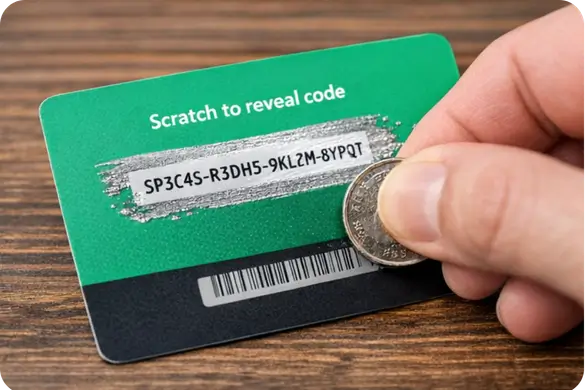
A physical Spotify gift card is usually sold in retail stores such as supermarkets, convenience stores, and electronics shops. The redeem code is normally hidden on the back of the card under a scratch-off layer.
Digital Spotify Gift Card
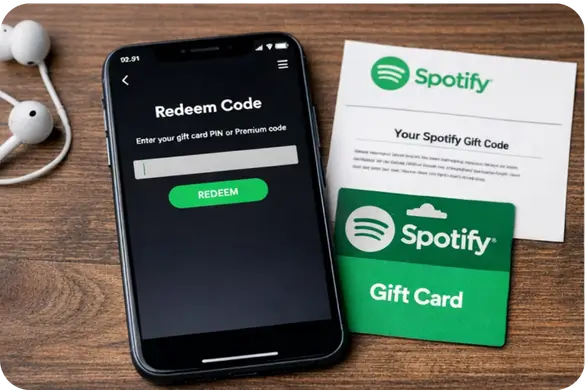
A digital Spotify gift card is purchased online and sent by email. Instead of scratching a card, you simply copy the code from the email and paste it into the Spotify redeem page.

How to Get a Spotify Gift Card
There are several easy ways to get a Spotify gift card.
Buy in a Store
Many local stores sell physical Spotify gift cards. You can choose the amount you want, pay at the counter, and take the card home with you.
Buy Online
You can also buy it from online retailers. In most cases, the code is sent to your email shortly after payment, which makes it a quick option when you need it fast.
Receive as a Gift
A lot of people get it from friends or family during birthdays, holidays, or special occasions. Since the card is easy to redeem, it is one of the most useful gifts for music lovers.
How to Redeem Spotify Gift Card Step by Step
If you are searching for how to redeem Spotify gift card codes, the process is very simple. You only need your Spotify account and the gift card code.
Step 1: Log In to Your Spotify Account
Go to Spotify and sign in to the account where you want to redeem the gift card. Make sure you are using the correct account before moving to the next step.
Step 2: Open the Spotify Redeem Page
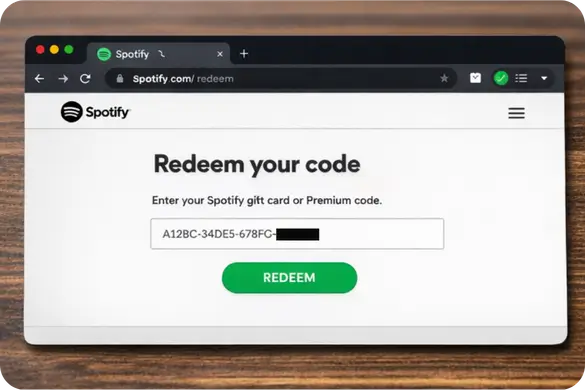
After logging in, visit the official redeem page in your browser:
This is the only page you should use to redeem your Spotify gift card safely.
Step 3: Enter the Gift Card Code
If you have a physical card, scratch the back gently to reveal the code. If you have a digital gift card, copy the code from the email you received.
Type or paste the code carefully into the box on the redeem page. It is important to avoid mistakes because even one wrong character can stop the code from working.
Step 4: Confirm the Redemption
Once the code is entered, click the redeem button. If the code is valid, the value will be added to your account.
That is all you need to do. The process takes only a few minutes and is straightforward even for first-time users.
How to Use After Redemption
After you redeem the code, the gift card value is applied to your Spotify Premium subscription. You do not need to activate anything else manually in most cases.
Once the balance is added, you can enjoy Spotify Premium features such as:
- Ad-free listening
- Offline downloads
- Unlimited skips
- Better overall listening experience
For users who do not want to connect a bank card, it is one of the easiest ways to access Premium.
Common Problems When Redeeming
Although redeeming a Spotify gift card is usually easy, a few common problems can appear.
Entering the Wrong Code
This is the most frequent issue. Some letters and numbers may look similar, especially on physical cards. Always double-check the code before submitting it.
Using the Wrong Spotify Account
Sometimes people redeem the card while logged into the wrong account. Before entering the code, make sure you are signed in to the account where you want to use the Premium balance.
Card Not Activated Properly
If the Spotify gift card was bought in a physical store, there is a chance it was not activated properly at checkout. In that situation, keeping the receipt can help you solve the issue with the retailer.
Region or Eligibility Restrictions
Some gift cards may have country-related conditions. If the code does not work and you are sure it was entered correctly, check Spotify’s official support information for regional rules.
Tips Before You Redeem
A few simple precautions can help you avoid problems.
Use the Official Redeem Page Only
Always redeem the card on the official Spotify website. This protects your account and makes sure the code is applied properly.
Keep Your Receipt
If you bought the card in a store, keep the receipt until the code works successfully. It can be useful if the card was not activated correctly.
Enter the Code Carefully
Take your time when typing the code, especially if it comes from a scratched physical card. A small error can prevent the redemption from going through.
Check Your Account First
Before redeeming the code, confirm that you are logged into the correct Spotify account. This is a simple step, but it saves a lot of trouble later.
Learning how to redeem Spotify gift card codes is easy once you know the correct steps. Log in to your Spotify account, open the official redeem page, enter your code carefully, and confirm the redemption. In just a few minutes, you can start enjoying Spotify Premium without needing a credit card or PayPal account.
It is also a great option for anyone who wants a simple prepaid way to pay for Premium. It is convenient, beginner-friendly, and makes a practical gift for anyone who loves music.
FAQ
What is a Spotify gift card?
It is a prepaid card that can be used to pay for Spotify Premium. It comes with a code that you redeem on your Spotify account.
How do I redeem a Spotify gift card?
Log in to your Spotify account, go to spotify.com/redeem, enter the gift card code, and confirm the redemption.
Can I use it without a credit card?
Yes. One of the main benefits is that you can use it without entering a credit card or PayPal details.
Where can I buy a Spotify gift card?
You can buy it in retail stores or from online shops that sell digital gift card codes.
What should I do if my Spotify gift card code is not working?
First, check that you entered the code correctly and that you are logged into the right Spotify account. If the issue continues, review Spotify support or contact the store where the card was purchased.